FireFenyx.Wpf.Notifications
1.0.0
dotnet add package FireFenyx.Wpf.Notifications --version 1.0.0
NuGet\Install-Package FireFenyx.Wpf.Notifications -Version 1.0.0
<PackageReference Include="FireFenyx.Wpf.Notifications" Version="1.0.0" />
<PackageVersion Include="FireFenyx.Wpf.Notifications" Version="1.0.0" />
<PackageReference Include="FireFenyx.Wpf.Notifications" />
paket add FireFenyx.Wpf.Notifications --version 1.0.0
#r "nuget: FireFenyx.Wpf.Notifications, 1.0.0"
#:package FireFenyx.Wpf.Notifications@1.0.0
#addin nuget:?package=FireFenyx.Wpf.Notifications&version=1.0.0
#tool nuget:?package=FireFenyx.Wpf.Notifications&version=1.0.0
FireFenyx.Notifications
Toast-style in-app notification library for WPF and WinUI 3 with animated transitions, progress tracking, persistent notifications, and two built-in visual styles.





Demo
| WPF | WinUI |
|---|---|
| ▶ Watch WPF demo | ▶ Watch WinUI demo |
Notification Styles
Fluent
A severity-colored background inspired by the WinUI InfoBar.
| WPF | WinUI |
|---|---|
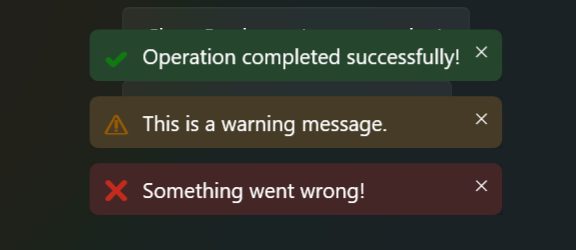 |
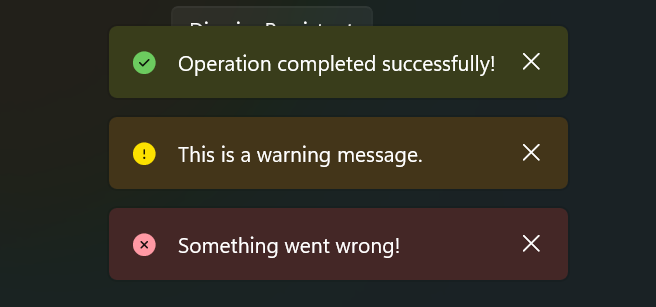 |
AccentStrip
A colored accent strip on the leading edge with a material background.
| WPF | WinUI |
|---|---|
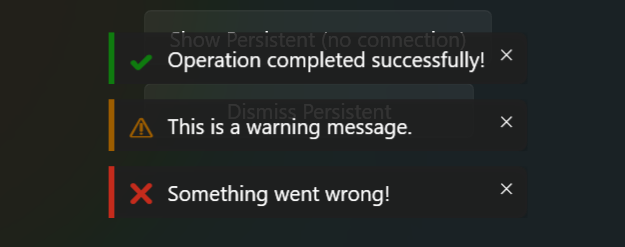 |
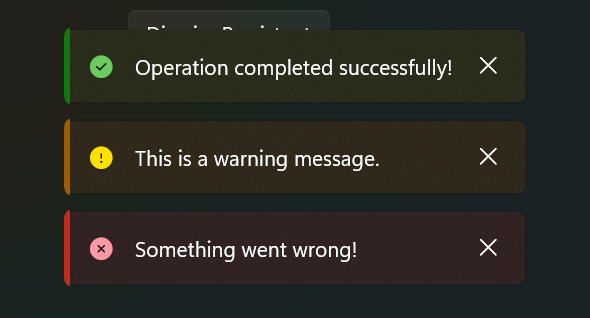 |
Features
- Success / Info / Warning / Error — one-liner convenience methods
- Progress notifications — determinate and indeterminate with live updates
- Persistent notifications — stay visible until dismissed programmatically
- Action buttons — attach an
ICommand,Action, orFunc<Task>to any notification - Animated transitions — SlideUp, Fade, Scale, SlideAndFade
- Background materials — Solid, Acrylic, Mica
- Two bar styles — Fluent and AccentStrip, switchable at runtime
- Auto-dismiss with configurable duration
- Stacking — multiple notifications stack with configurable spacing and position (Top / Bottom)
- DI-friendly — one call to register, auto-connects to the host control
- Shared abstractions — write your ViewModel once, run on both WPF and WinUI
Solution Structure
FireFenyx.Notifications.Abstractions      → Shared models, interfaces, service implementation (net10.0)
FireFenyx.Wpf.Notifications              → WPF control + queue (net10.0-windows)
FireFenyx.WinUI.Notifications            → WinUI 3 control + queue (net10.0-windows10.0.22621.0)
FireFenyx.Notifications.SampleApp.Shared → Shared ViewModel + IDialogService (net10.0)
FireFenyx.Wpf.Notifications.SampleApp    → WPF sample app
FireFenyx.WinUI.Notifications.SampleApp  → WinUI 3 sample app
FireFenyx.Wpf.Notifications.Tests        → WPF unit tests (xUnit)
FireFenyx.WinUI.Notifications.Tests      → WinUI unit tests (xUnit)
Installation
Install the package for your target framework:
WPF
dotnet add package FireFenyx.Wpf.Notifications
WinUI 3
dotnet add package FireFenyx.WinUI.Notifications
Each package brings in FireFenyx.Notifications.Abstractions automatically.
Getting Started
1. Register services
var services = new ServiceCollection();
services.AddNotificationServices();
2. Drop the host control in your window
WPF
<notifications:NotificationHost
    BarStyle="{Binding SelectedBarStyle}"
    HostPosition="Bottom"
    DefaultDurationMs="4000"
    DefaultTransition="SlideAndFade"
    DefaultMaterial="Acrylic"
    HostHorizontalAlignment="Center"
    HostSpacing="10"
    HostPadding="0,0,0,8" />
WinUI
<notifications:NotificationHost
    BarStyle="{x:Bind ViewModel.SelectedBarStyle, Mode=OneWay}"
    HostPosition="Bottom"
    DefaultDurationMs="4000"
    DefaultTransition="SlideAndFade"
    DefaultMaterial="Acrylic"
    HostHorizontalAlignment="Center"
    HostSpacing="10"
    HostPadding="0,0,0,8" />
The host auto-connects to the
INotificationQueueregistered byAddNotificationServices()— no manual XAML wiring needed.
3. Show notifications
// One-liners
_notifications.Success("Operation completed!");
_notifications.Warning("Check your connection.");
_notifications.Error("Something went wrong!", durationMs: 5000);

// Progress
var handle = _notifications.ShowProgress("Uploading...", progress: 0);
handle.Report(50, "Uploading... 50%");
handle.Complete("Upload finished!");

// Persistent
var persistent = _notifications.ShowPersistent(
    "No connection. Retrying...",
    level: NotificationLevel.Warning,
    isClosable: false);
// later...
persistent.Dismiss();

// Full control
_notifications.Show(new NotificationRequest
{
    Message = "Sending file...",
    Level = NotificationLevel.Info,
    IsInProgress = true,
    ActionText = "Cancel",
    ActionCommand = MyCancelCommand,
    DurationMs = 3000
});
Host Properties
| Property | Type | Default | Description |
|---|---|---|---|
HostPosition |
Top / Bottom |
Bottom |
Where notifications stack |
BarStyle |
Fluent / AccentStrip |
Fluent (WinUI) / AccentStrip (WPF) |
Visual style |
DefaultDurationMs |
int |
3000 |
Auto-dismiss duration (ms) |
DefaultTransition |
SlideUp / Fade / Scale / SlideAndFade |
SlideAndFade |
Animation |
DefaultMaterial |
Solid / Acrylic / Mica |
Acrylic |
Background material |
HostHorizontalAlignment |
Left / Center / Right / Stretch |
Center |
Horizontal alignment |
HostSpacing |
double |
8 |
Gap between stacked notifications |
HostPadding |
Thickness |
0 |
Additional padding around the stack |
NotificationWidth |
double |
0 (auto) |
Fixed notification width |
NotificationMaxWidth |
double |
0 (none) |
Maximum notification width |
Requirements
- .NET 8, .NET 9, or .NET 10
- Windows App SDK 1.8+ (WinUI)
Note: The sample apps and unit tests target .NET 10 and require the .NET 10 SDK to build and run.
License
MIT — Jose Valencia
| Product | Versions Compatible and additional computed target framework versions. |
|---|---|
| .NET | net8.0-windows7.0 is compatible. net9.0-windows was computed. net9.0-windows7.0 is compatible. net10.0-windows was computed. net10.0-windows7.0 is compatible. |
-
net10.0-windows7.0
- FireFenyx.Notifications.Abstractions (>= 1.0.0)
- Microsoft.Extensions.DependencyInjection (>= 10.0.1)
-
net8.0-windows7.0
- FireFenyx.Notifications.Abstractions (>= 1.0.0)
- Microsoft.Extensions.DependencyInjection (>= 8.0.1)
-
net9.0-windows7.0
- FireFenyx.Notifications.Abstractions (>= 1.0.0)
- Microsoft.Extensions.DependencyInjection (>= 9.0.0)
NuGet packages
This package is not used by any NuGet packages.
GitHub repositories
This package is not used by any popular GitHub repositories.
| Version | Downloads | Last Updated |
|---|---|---|
| 1.0.0 | 104 | 3/11/2026 |
| 1.0.0-preview.3 | 50 | 3/10/2026 |
| 1.0.0-preview.2 | 37 | 3/9/2026 |
| 1.0.0-preview.1 | 39 | 3/8/2026 |